
Introduction
Databases are the backbone of most applications. In the first days of a project every query runs very fast because the data is small. Then the number of users grows and records pile up, and slow queries (bottlenecks) start to slow down the whole application.
The first thing many developers think of is upgrading the server. But the real cause usually lies in how the queries are written and in the lack of suitable indexes, and that is what we deal with here.
1. Understanding the execution plan
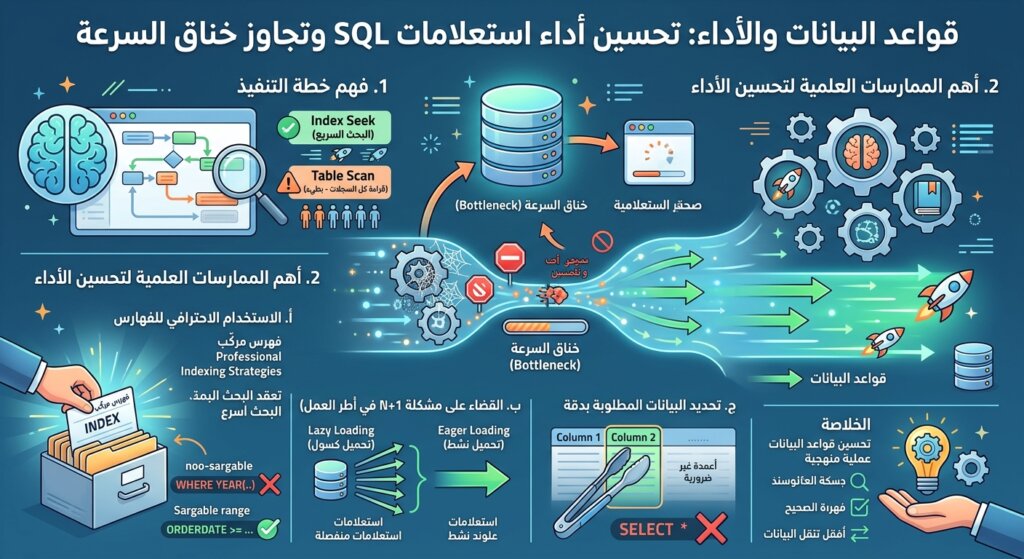
Before optimising any query, you need to know how the database actually processes it. Most SQL engines, such as SQL Server and PostgreSQL, offer a tool called the execution plan that shows the steps the engine takes. You will usually see one of two patterns:
- Index Seek / Index Scan: a fast, efficient search through the available indexes.
- Table Scan / Clustered Index Scan: reading the whole table record by record, the number one cause of slow performance on large tables.
Tip: if you see a Table Scan on a table with millions of records, that is a clear sign your query needs a review.
2. Best practices for better performance
a. Using indexes correctly
An index is like the word index at the back of a big book: without it you would have to read the whole book to find one word.
Composite indexes
If you keep querying with more than one condition in WHERE, create one index that covers both columns:
SELECT * FROM Orders
WHERE Status = 'Active' AND CreatedDate > '2026-01-01';
CREATE INDEX IX_Orders_Status_CreatedDate
ON Orders (Status, CreatedDate);
Watch the column order: as a general rule, put the columns used with equality conditions (=) first, then the columns used with range conditions (>, <, BETWEEN).
b. Write sargable conditions and avoid the N+1 problem
Avoid wrapping an indexed column in a function inside WHERE, because the engine can then no longer use the index. And in an ORM such as Entity Framework, load related data with Include in a single combined query instead of one query per record.
Note: if the relationships are large or many, Include can produce a huge query. In that case try AsSplitQuery() in EF Core.
c. Ask only for what you need
Avoid SELECT * in production. Fetching unnecessary columns does three kinds of harm:
- It uses server memory.
- It adds load on network bandwidth.
- It denies you covering indexes, which hold all the requested columns so the query is answered from the index directly without going back to the table.
-- Instead of
SELECT * FROM Customers WHERE City = 'Baghdad';
-- Use
SELECT Id, Name, Email FROM Customers WHERE City = 'Baghdad';
Conclusion
Before you buy a more powerful server, follow these steps:
- Check the execution plan of slow queries.
- Add the right indexes and mind the column order.
- Write sargable conditions that let the engine use the index.
- Get rid of N+1 in the ORM layer.
- Fetch only the columns you need.
Getting one query right is often more effective than any hardware upgrade.



























 English
 Arabic
