
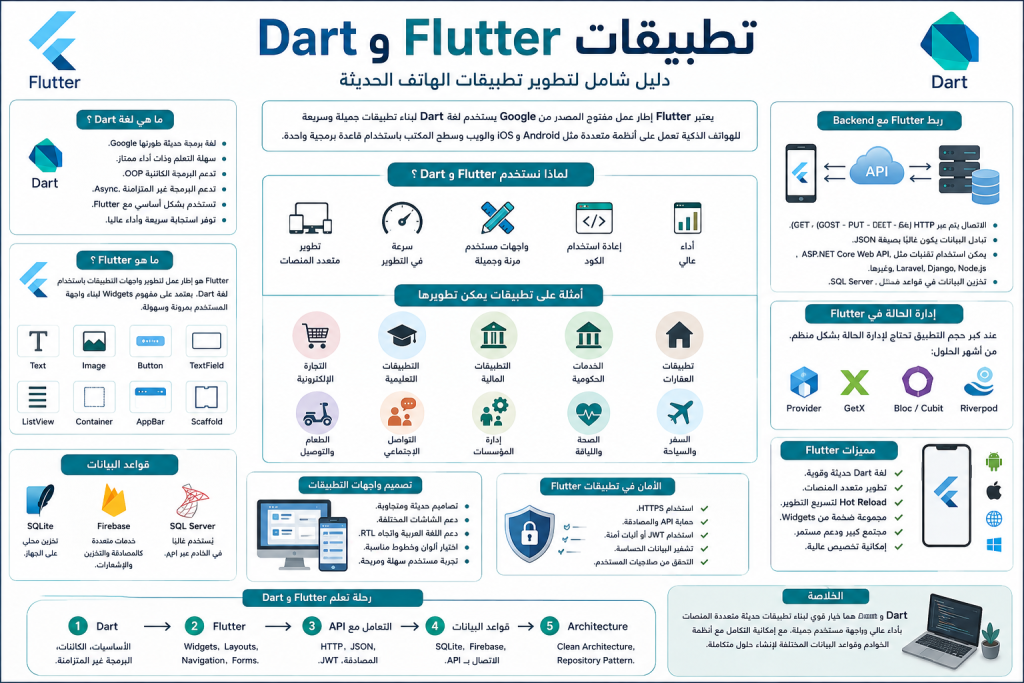
Flutter and Dart apps: a complete guide to modern mobile app development
Introduction
Smartphone apps have become an essential part of daily life, whether in education, e-commerce, government services, banking or social media. With the rapid development of programming technologies, frameworks have appeared that help developers build apps faster and more efficiently, and among the most prominent are Flutter and the Dart programming language.
Flutter is an open-source framework developed by Google, built mainly on Dart. It can create apps that run on several platforms, such as Android, iOS, the web and desktop, from almost one codebase, which reduces the time and effort needed to build and maintain apps.
First: what is Dart?
Dart is a modern programming language developed by Google, designed for building high-performance apps with interactive user interfaces.
Dart has several features, including:
- It is easy to learn and its code is clear to write.
- It supports object-oriented programming (OOP).
- It supports asynchronous programming.
- It uses a strong type system.
- It supports async and await for operations that take time.
- It can be used with Flutter to build modern app interfaces.
- It gives good performance when apps run.
Dart is mainly used with Flutter, where the language provides the programming base the developer relies on to build the app's logic and handle data and different operations.
Second: what is Flutter?
Flutter is a framework for building app interfaces that lets the programmer create cross-platform apps with Dart.
One of the key ideas behind Flutter is widgets: the app's interface is built from a set of components such as buttons, text, lists, images and input fields.
For example, an app can be made of:
- Scaffold to build the basic page structure.
- AppBar to create the title bar.
- Text to display text.
- Image to display images.
- TextField to enter data.
- ElevatedButton to create buttons.
- ListView to display lists.
- Container to format and arrange elements.
This approach makes building interfaces more flexible and allows components to be reused in more than one place in the app.
Third: why use Flutter and Dart?
Several reasons have made Flutter an important technology in app development.
1. More than one platform
A developer can use Flutter to create apps for Android, iOS, the web and some desktop systems, sharing a large part of the code between platforms.
This reduces the need for a separate project for each system.
2. Fast development
One of the most important features of Flutter is hot reload, which lets the developer see interface changes quickly during development, in many cases without restarting the whole app.
3. Flexible user interfaces
Flutter offers a large set of widgets and lets the developer build custom widgets and design interfaces exactly as required.
4. Performance
Flutter builds apps in a way that helps achieve good performance, and Dart is designed for interactive apps that need a fast response.
5. Code reuse
Large parts of the code can be shared between Android and iOS, which helps reduce development time and project costs.
Fourth: types of apps you can build with Flutter
Flutter can be used to build many kinds of apps, not only simple ones.
1. E-commerce apps
Flutter is widely used in online store apps, and can be used to build:
- Product pages.
- Product categories.
- The shopping cart.
- The ordering system.
- Sign-in and account creation.
- Online payment.
- Order tracking.
- Notifications.
- Product search.
Examples include apps that sell clothes, electronics, groceries and more.
2. Educational apps
Flutter can be used to build educational platforms and apps that include:
- Lessons and lectures.
- Online exams.
- Student grades.
- Timetables.
- PDF files.
- Educational videos.
- Notifications.
- Communication between student and teacher.
The app can also be connected to a back-end server and database to manage student and teacher information.
3. Banking and finance apps
Flutter can be used to build finance apps that handle:
- Accounts.
- Transfers.
- Bills.
- Payments.
- Financial reports.
- Notifications.
- Transaction history.
Finance apps, however, need a very high level of security and data protection.
4. Government services apps
Apps can be built to provide government services to citizens, such as:
- Submitting applications.
- Following up on transactions.
- Booking appointments.
- Uploading documents.
- Notifications.
- Checking application status.
These apps can be connected to back-end systems and central databases.
5. Real estate apps
Real estate apps can be built with Flutter to show:
- Properties for sale.
- Properties for rent.
- Property photos.
- The property's location on the map.
- The price.
- The area.
- The number of rooms.
- Owner or agency details.
- Search and filtering by area and price.
Google Maps and location services can also be added.
6. Restaurant and delivery apps
You can build apps that let the user:
- Choose a restaurant.
- See the menu.
- Add items to the cart.
- Set the delivery address.
- Send the order.
- Track the order.
The system can be made of a customer app, a driver app and an admin dashboard.
7. Social media apps
You can build apps that include:
- User accounts.
- Posts.
- Photos and video.
- Likes.
- Comments.
- Following.
- Messages.
- Notifications.
This kind of app needs a strong back end and a suitable database.
8. Organisation management apps
Flutter can be used to build internal apps for companies and institutions to manage:
- Employees.
- Attendance.
- Leave.
- Requests.
- Correspondence.
- Departments.
- Reports.
- Permissions.
Fifth: connecting a Flutter app to a back end
Modern apps usually do not rely on Flutter alone; they connect to a back-end server responsible for processing data.
Among the best-known technologies that can be used with Flutter:
- ASP.NET Core Web API.
- Node.js.
- Laravel.
- Django.
- Spring Boot.
For example, the app can be built with Flutter and Dart, while the server is built with ASP.NET Core Web API and the data is stored in SQL Server.
Communication usually happens through HTTP requests such as:
- GET to fetch data.
- POST to add data.
- PUT or PATCH to update data.
- DELETE to delete data.
Data is usually exchanged in JSON format.
A simple example of data the server might send:
{
"id": 1,
"name": "Ahmed",
"email": "ahmed@example.com"
}
The Flutter app receives this data, turns it into models and uses it in the interface.
Sixth: databases in Flutter apps
Flutter does not impose a single database on the developer; you can choose the right technology for the project.
Common options include:
- SQLite: suited to storing data locally on the phone, especially when the app needs to work offline.
- Firebase: offers several services such as Authentication, Cloud Firestore, Storage, Firebase Cloud Messaging and Analytics.
- SQL Server: usually used on the server rather than directly inside the phone app, where Flutter talks to an API and the API talks to SQL Server.
Seventh: state management in Flutter
As the app grows, it becomes necessary to organise and manage the app's state.
The best-known solutions include:
- Provider.
- GetX.
- Riverpod.
- Bloc/Cubit.
These tools help manage data such as:
- The current user.
- Sign-in status.
- Products.
- The shopping cart.
- Orders.
- Notifications.
- App settings.
Choosing the right approach depends on the size of the project, the team's experience and the nature of the app.
Eighth: designing app interfaces
Flutter makes it possible to create modern interfaces that adapt to different screen sizes.
When designing a Flutter app, it is important to pay attention to:
- Ease of use.
- Consistent colours.
- Choosing the right font.
- Button size.
- Spacing between elements.
- Support for different screens.
- Support for Arabic and right-to-left (RTL) layout.
- Accessibility.
For Arabic apps, attention must be paid to the right-to-left direction of the interface, as well as choosing a clear Arabic font such as Cairo or Tajawal.
Ninth: security in Flutter apps
Security is essential in apps that handle users' data.
The most important measures include:
- Using HTTPS.
- Protecting the API.
- Using JWT or suitable authentication mechanisms.
- Not storing passwords inside the app.
- Encrypting sensitive data.
- Checking user permissions.
- Protecting the API from unauthorised requests.
- Validating data coming from users.
- Not placing secret keys inside the app in plain sight.
Authentication and permissions must also be managed properly on the server side, not left to the app alone.
Tenth: the advantages of Flutter in projects
The main advantages can be summed up as follows:
| Feature | Benefit |
|---|---|
| Dart | A modern language suited to Flutter apps |
| Cross-platform | Several platforms from a shared codebase |
| Hot reload | Faster development |
| Widgets | Flexible, reusable interfaces |
| Performance | Suited to interactive apps |
| Community | Many libraries and solutions available |
| Design freedom | Custom interfaces are possible |
| Integration | Connects to many services and APIs |
Eleventh: challenges a Flutter developer faces
Despite its many advantages, there are some challenges to keep in mind.
The most important include:
- Some apps may be larger than simple native apps.
- The developer needs to understand both Dart and Flutter.
- Some external libraries may have compatibility problems with Flutter or Android versions.
- Dealing with Android, Gradle and SDK updates may require good knowledge of the development environment.
- Large projects need a clear architecture from the start.
- Packages must be chosen carefully, without relying on untrusted libraries.
Twelfth: the best way to learn Flutter and Dart
The learning journey can be divided into stages.
Stage 1: learn Dart
Start with:
- Variables.
- Data types.
- Functions.
- Classes.
- Objects.
- Inheritance.
- Lists and maps.
- Null safety.
- Future.
- Async/await.
Stage 2: learn Flutter
Then learn:
- Widgets.
- StatelessWidget.
- StatefulWidget.
- Layouts.
- Navigation.
- Forms.
- Validation.
- Lists.
- Images.
- Themes.
Stage 3: working with APIs
Once the basics are clear, the developer learns:
- HTTP.
- REST API.
- JSON.
- Models.
- Authentication.
- JWT.
- Uploading images and files.
Stage 4: databases
Then you can learn:
- SQLite.
- Firebase.
- SQL Server through an API.
Stage 5: architecture
In large projects, it is important to learn to organise the project with approaches such as:
- Clean Architecture.
- Repository pattern.
- Service layer.
- Dependency injection.
- State management.
Thirteenth: the future of Flutter and Dart
Cross-platform app development has become an important trend in software, because companies want to reduce time and cost while keeping app quality high.
Flutter offers a strong option for this kind of development, especially for projects that need Android and iOS apps sharing a large part of their code.
Using Dart with Flutter also provides an integrated environment for developing app interfaces and logic in an organised, scalable way.
Conclusion
Flutter and Dart are among the important technologies in modern app development. Instead of building a separate app for each platform, a developer can build a shared codebase and develop cross-platform apps, with strong tools for designing interfaces, managing data and working with external services.
Flutter becomes even stronger when combined with back-end technologies such as ASP.NET Core Web API and databases such as SQL Server, making it possible to build complete systems that start with the phone app and end with the server, the database and the admin dashboard.
So learning Dart and Flutter is not only about learning how to design an app screen. It means understanding the whole app life cycle, from interface design, through state management and connecting to APIs and databases, to security, testing and publishing.
Flutter and Dart can therefore be considered a good choice for developers who want to build modern, scalable apps, whether commercial, educational, service, administrative, real estate or other apps.

























 English
 Arabic
