
An introduction to Docker
1. What is Docker?
Docker is a technology for running applications inside isolated environments called containers. A container holds the application together with the libraries and settings it needs to run.
It helps run applications on different machines and environments without having to set up all their requirements again each time.
Example: you can develop an application on your own machine and then run it on another server with exactly the same runtime environment.
2. Why do we use Docker?
Docker is used for these reasons:
- To standardise the environment applications run in.
- To make it easy to move applications between machines and servers.
- To reduce problems caused by differences in libraries and settings.
- To start applications quickly, usually with fewer resources.
- To make deploying and managing applications easier.
3. Docker compared with virtual machines
Docker:
- Runs applications inside lightweight containers.
- Containers share the host operating system's kernel.
- Usually starts quickly and uses few resources.
Virtual machines:
- Usually contain a full operating system of their own.
- Use more resources in many cases.
- Are suited to running different operating systems.
4. The main components of Docker
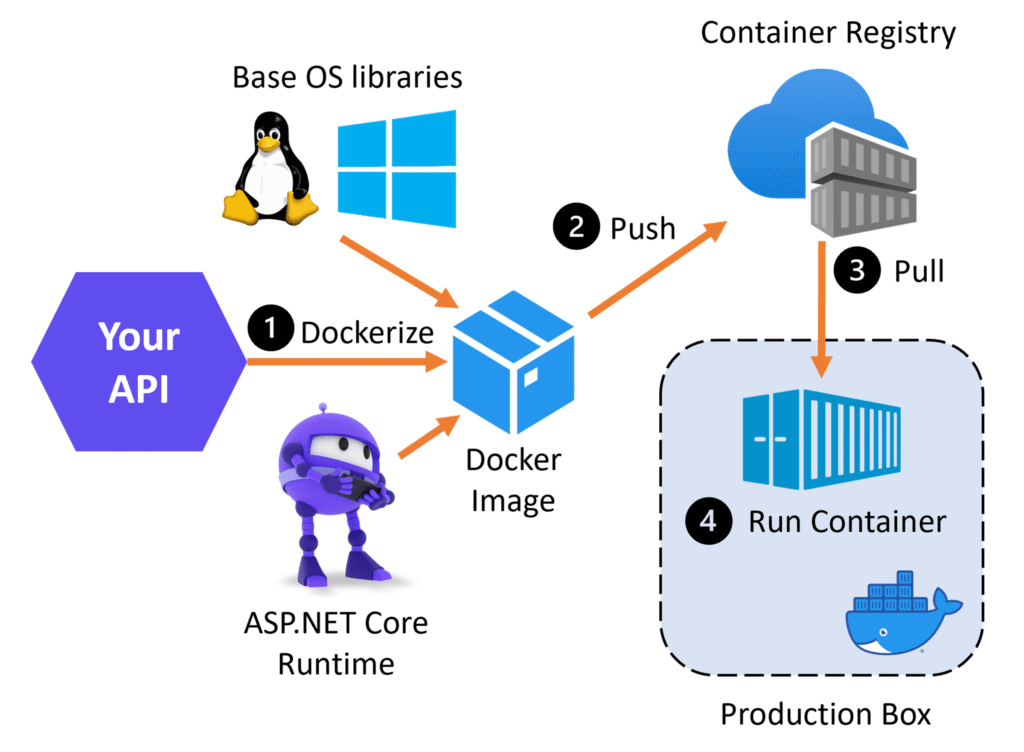
- Docker Image: a template that contains the application, its files and the libraries it needs to run.
- Docker Container: an environment created from an image to run the application in relative isolation.
- Docker Engine: responsible for building images and running and managing containers.
- Docker Hub: a platform for storing, sharing and downloading Docker images.
5. How does Docker work?
Using Docker goes through these steps:
- Write the application in a programming language.
- Create an instructions file that prepares the application.
- Build an image that contains the application and its requirements.
- Create a container from the image and run the application.
- Move the image to another server when needed.
- The most important Docker commands
Show the Docker version:
docker --versionDownload the nginx web server image:
docker pull nginxList the images you have:
docker imagesList running containers:
docker psRun a new container:
docker run -d -p 8080:80 nginxStop a container:
docker stopShow a container's logs:
docker logsA practical example
After running this command:
docker run -d -p 8080:80 nginxopen your browser and go to:
http://localhost:8080
The default nginx page will appear if it started successfully and the port is free.
7. What is Docker Compose?
Docker Compose is a tool for running and managing several connected services from one settings file.
For example, you can run a web application with a database and a background service using one shared setup.
Start the services:
docker compose up -dStop the services:
docker compose down- How Docker made life easier for .NET Core developers
Docker brought an important change to how applications are developed with .NET Core, helping developers get past many of the challenges of setting up work environments and deploying and running applications on different servers.
Among its main benefits:
- A standard development environment: you can run the application with a specific .NET version, libraries and settings, which reduces differences in results between developers' machines and servers.
- Simpler database setup: databases such as SQL Server and PostgreSQL can run inside containers without being installed by hand on every machine.
- Easier deployment: you can build an image of the application and run it on any server that supports Docker, making deployment more organised and repeatable.
- Faster teamwork: team members can use the same environment, which cuts the time spent on setup and compatibility problems.
- Support for microservices: it became easier to run each service of the application independently and connect it to the others as needed.
- Better continuous integration and delivery: Docker can be combined with automated testing and deployment tools to reduce manual work and make releases more reliable.
So Docker is no longer just a way to run applications. It has become an important tool that lets .NET Core developers focus more on writing code and building features, rather than spending time setting up environments and dealing with their differences.
9. Where Docker is used
Docker is used in many areas, including:
- Developing web applications.
- Running databases during development.
- Testing and deploying applications.
- Running applications on cloud servers.
- Managing development and production environments.
- Supporting DevOps work.
Conclusion
Docker is a technology that makes it easy to run and move applications by placing them in containers that hold their essential requirements.
It has made the work of .NET Core developers easier by standardising work environments, simplifying service setup, speeding up deployment and improving collaboration between team members.
Understanding images, containers, the Docker Engine and Docker Compose is an important step for anyone who wants to grow their skills in software development, DevOps and cloud computing.



























 English
 Arabic
