
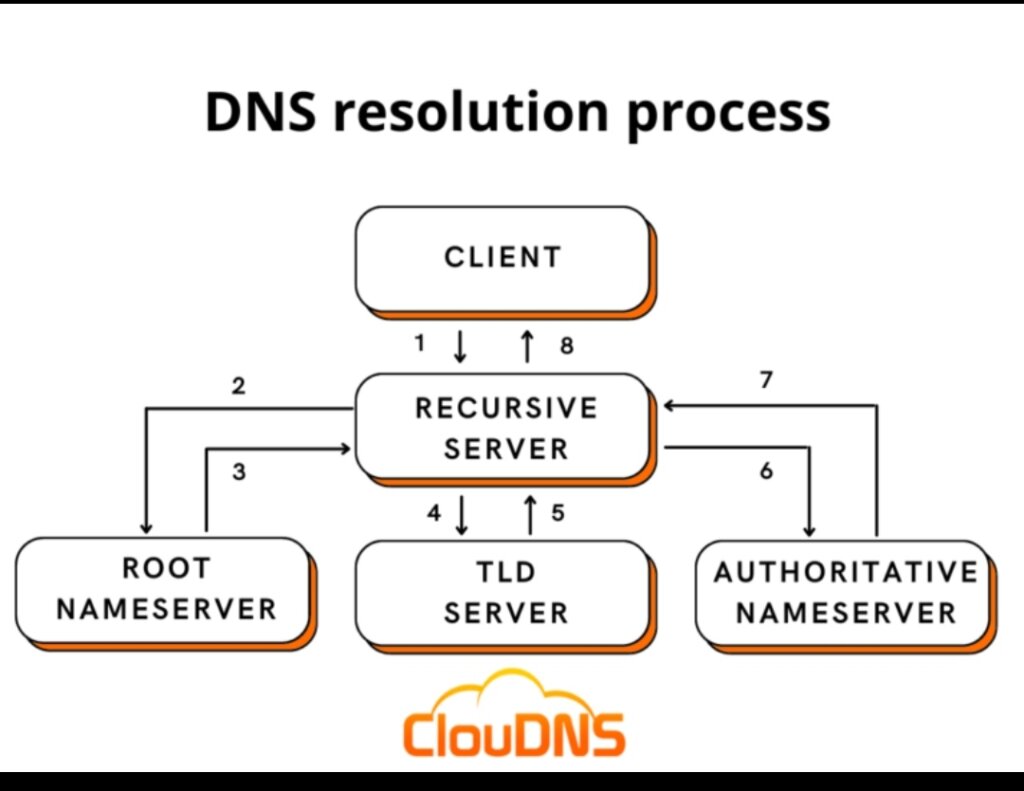
The Domain Name System (DNS) converts website names written in letters (such as google.com) into numerical addresses (IP addresses) that computers and networks understand, much like a phone book that links people's names to their phone numbers.
The translation happens through a series of quick, successive steps in less than a second:
The steps of the translation process (DNS lookup)
1. Searching the browser cache
• When you type a website name into the browser, the browser first checks whether it has visited this site recently and already has its IP address stored.
2. Searching the operating system cache (OS / DNS cache)
• If the browser does not find it, it asks your device's operating system, which also keeps a table of addresses you have visited recently.
3. Sending the request to the recursive resolver
• If the device does not find it locally, the request is sent to a server called the "recursive resolver" (usually operated by your internet service provider, or a public server such as Google's 8.8.8.8).
4. Querying the root server
• If the address is not stored at the resolver, it asks the "root server", the top of the DNS hierarchy. The root server does not know the site's address itself; instead, it directs the resolver to the server responsible for the domain's extension
• (such as .com or .net).
5. Querying the top-level domain (TLD) server
• The query moves to the TLD server for the extension (for example, the .com domain server), which in turn directs the resolver to the name server of the website itself.
6. Querying the authoritative name server
• The request finally reaches the authoritative server belonging to the website owner, which holds the real, accurate record containing the site's actual IP address.
7. Receiving the response and caching it
• The IP address returns to your device through the resolver, the browser opens the website, and the IP address is cached temporarily for a period of time.

 English
 Arabic